Showing posts with label web-tips. Show all posts
Showing posts with label web-tips. Show all posts
Wednesday, October 20, 2010
0
Wednesday, October 20, 2010
Anonymous

join spread firefox affiliate program and earn rewards
Some might have heard about Spread Firefox, an initiative by Mozilla community to spread the word of Firefox among the Internet users. Recently they had added an affiliate program for bloggers and webmasters to earn cool prizes. As a Spread Firefox affiliate you earn credit for each download made through your link and top affiliates name will be displayed on their website. Well, its not only for blogger and webmaster, even students can benefit by becoming Firefox campus rep to spread the word about Firefox within their college or university. So why wait, get yourself involved with Spread Firefox campaign and earn rewards.
Still using IE? Download the latest version of Firefox
0
Anonymous
 Read more...
5 must have firefox addon for better surfing
Ever since Firefox came into existence, their growth seems unstoppable. Even with big players like Google getting into this business with lighter and simpler web browser experience, Firefox looks to be the people favorite in reliability. Especially Firefox add-on has gained huge popularity among user, with more than hundred thousands addon available, there by making it one of the largest addon base for any web browser. Here I am listing out some of the must have Firefox add-on for better surfing.

1. Adblock Plus: Most of us get annoyed by advertisements and banners on the Internet. At many instance it sucks our bandwidth, by increasing the web page loading time. This is a perfect add-on which avoids all those flashy glossy banner and stops you from annoying about advertisements.
2. Tab Mix Plus: This add-on takes tab browsing to a next level. It comes with cool features such as duplicating tabs, tab clicking options, undo closed tabs, window and much more. A very useful add-on for those who close the tab or a window by mistake, which leads to losing those browsed session.
3. DownloadThemAll: This is the first ever download manager build inside Firefox. It comes with a accelerator to boost your download speed by upto 400% and also allow you to pause and resume the download. All you need is to just hit on this add-on to download all the links and images in the web page. Good news is DownloadThemAll is absolutely free to use.
4. Firefox Showcase: Got impressed by Internet Explorer showcase feature, then you can expect the same from Firefox with Firefox Showcase. This add-on manages your Firefox tabs and windows by displaying them as thumbnails.
5. Sxipper: If you are an Internet savvy having multiple accounts with many websites, then this add-on is for you. Sxipper keep tracks of your unlimited user name, password and personal information securely on your computer. So no more worries of losing your stored info, when you reinstall the application.
0
Anonymous
 Read more...
How to create custom username url for facebook fan page
Facebook has opened up the feature of setting our own custom username for Facebook fan page on Jun 12th 2009. But sadly only few are aware of how to change the default fan page URL to custom URL. Normally when we create a page, we get the fan page URL as www.facebook.com/pages/Bloggermint/163941377964, but if you have more than 25 liked members for your page, you have the ability to create a custom username, which looks like www.facebook.com/bloggermint.
How to create custom username
1. Login to your Facebook account
2. Open a new tab and type http://www.facebook.com/username
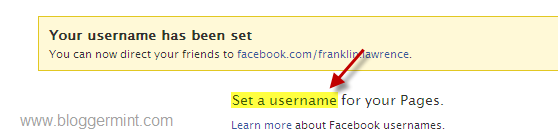
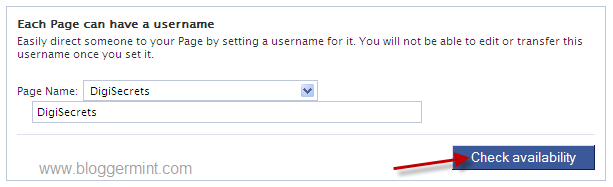
3. Click on Set a username and choose the fan page to add a custom username, if its available
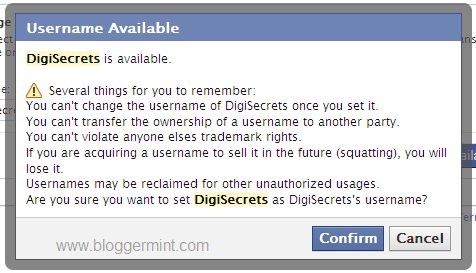
(Note: Before hitting confirm, be sure that you haven’t made any typo errors. The username cannot be changed once set, so be cautious before confirming)
4. Finally hit on Confirm button to change the default URL structure to your own custom username.
The same procedure can be used to even change your Facebook profile page link. I hope this might help to short your fan page URL and some brand value to the URL.
Subscribe to:
Posts (Atom)


